[scode type=“yellow” size=""] 根据个人经验,Spring Data Neo4j 不同版本之间的差异非常大。我也是发现网上所有教程都过时才不得不读文档、官方社区翻问题的。建议先看看版本是否和我相同。[/scode]
[scode type=“blue” size=""] 版本:Neo4j 5.6.0,Spring Data Neo4j 7.0.4,Spring Boot 3,Java 17[/scode]
使用
Spring Boot 集成 neo4j 主要使用 Spring Data Neo4j
添加依赖项和建立实体的映射请自己阅读文档相应部分,非常简单。
我这里只介绍 Spring Data Repositories 部分,也就是 jpa 和数据库交互的代码。
[scode type=“blue” size=""] 根据我在官方社区找到的回答,Spring Data Neo4j 只用于查询和实体相关的结果,不支持查询自定义的多个字段,如果查询结果有自定义的多个字段,应该使用 Neo4jClient,下面会介绍。[/scode]
Spring Data Repositories
返回实体相关
这里日常的 crud 和 jpa 的使用差不多,包括分页等,但是注意如果直接使用 jpa 而不是 @Query 自定义查询语句的话,返回的实体中会包含关系映射对应的值,如果关系映射对应的值还有关系的话,都会返回,可能得到一堆不需要的值。例如:
@Node("Mathematician")
public class Mathematician {
    @Id
    private final Long mid;
    @Property("name")
    private final String name;
    @Property("country")
    private final String country;
    @Property("title")
    private final String title;
    @Property("year")
    private final Integer year;
    @Property("institution")
    private final String institution;
    @Property("dissertation")
    private final String dissertation;
    @Property("classification")
    private final Integer classification;
    @Relationship(type = "advisorOf", direction = Relationship.Direction.OUTGOING)
    private List<Mathematician> students = new ArrayList<>();
    @Relationship(type = "studentOf", direction = Relationship.Direction.INCOMING)
    private List<Mathematician> advisors = new ArrayList<>();
}
//第一种方法
Mathematician findMathematicianByMid(Long mid);
//第二种方法
@Query("match (m) where m.mid=$mid return m")
Mathematician findMathematicianByMid(Long mid);第一个方法返回的值中 students 和 advisors 都会有符合关系的值,而 list 其中的 Mathematician 又有这两个属性,会一层层都查询进去,可想而知如果这条路径够长会返回多少数据,所以非必要时不使用这种方法。
第二个方法返回的值中 students 和 advisors 都为空。
注意查询结果只能和数据库中节点映射的实体有关。查看 支持的返回类型,也就是里面的 T 类型只能是节点映射的实体。
返回实体的部分属性
如果查询只想要实体的部分属性,也可以使用投影(上面实现第二种方法的效果应该也能用这种方法)。
我没用过,自己看文档吧。(~o ̄3 ̄)~
返回单列数据
还有一种情况如果返回单列数据如下图: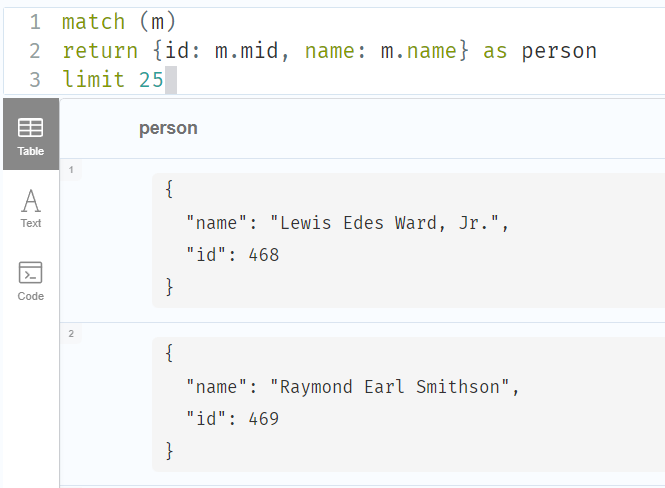
此时就算返回的数据不能映射到实体(使用一些聚合函数、转换成树之类的很常见),用 List<Map<String, Object>> 也可以接受数据,但是后面对数据操作只能使用 Map 的方法得到值。
一个要注意的地方
使用 @Query 自定义查询语句时,如果匹配节点的属性,不是在 where 中匹配而是在 (m:Mathematician{mid:123}) 中这样匹配的话,平常我们是使用 $mid 匹配方法形参的,但是这里要用 :#{literal(#mid)}。
这个文档中 @Query("MATCH (n:`:#{literal(#label)}`) RETURN n") 里面还用 ` 包裹起来,但我自己用的时候去掉才能正常使用。
例子如下:(这个 depth 我不知道有没有必要也用这种格式,我是直接统一成一种格式了)
@Query("""
        match (m:Mathematician{mid::#{literal(#mid)}})
        call apoc.path.spanningTree(m, {
        	relationshipFilter: "studentOf>",
            minLevel: 0,
            maxLevel: :#{literal(#depth)}
        })
        yield path
        with collect(path) as pathList
        call apoc.convert.toTree(pathList)
        yield value
        return value
        """)
List<Map<String, Object>> findAdvisorTreeByMid(Long mid, Long depth);
Neo4jClient
[scode type=“yellow” size=""] 我下面讲的都是以命令式客户端为例的,反应式客户端返回的数据类型不同。[/scode]
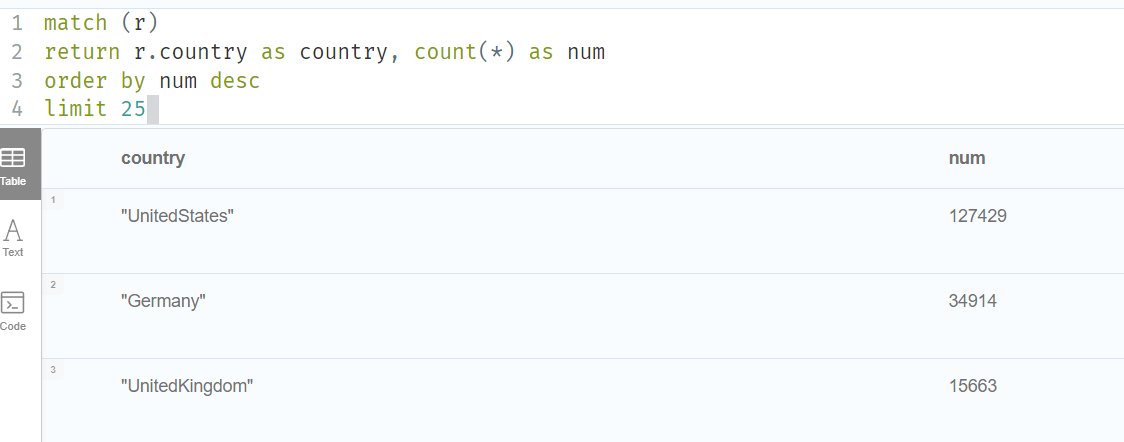
如果返回的是多列数据,又和实体对应不上去,这时候就要用 Neo4jClient,如下图:
拿自己的代码做例子:
@Repository
public class Neo4jClientRepository {
    @Resource
    Neo4jClient client;
    @Resource
    Neo4jMappingContext mappingContext;
    @Resource
    MathematicianMapper mathematicianMapper;

    public Optional<MathematicianVO> findByMid(Long mid) {
        BiFunction<TypeSystem, MapAccessor, Mathematician> mappingFunction = mappingContext.getRequiredMappingFunctionFor(Mathematician.class);
        return client
                .query("""
                        match (n{mid:$mid})
                        with n
                        optional match (n)-[:advisorOf]->(s)
                        optional match (n)-[:studentOf]->(a)
                        with n as person, collect(distinct {mid:s.mid,name:s.name}) as students, collect(distinct {mid:a.mid,name:a.name}) as advisors
                        return person,
                        case
                            when apoc.coll.contains(students,{name:NULL,mid:NULL}) then []
                            else students
                        end as students,
                        case
                            when apoc.coll.contains(advisors,{name:NULL,mid:NULL}) then []
                            else advisors
                        end as advisors
                        """)
                .bind(mid).to("mid")
                .fetchAs(MathematicianVO.class)
                .mappedBy((TypeSystem t, Record record) -> {
                    MathematicianVO person = mathematicianMapper.toMathematicianVO(mappingFunction.apply(t, record.get("person").asNode()));
                    person.setAdvisors(record.get("advisors").asList());
                    person.setStudents(record.get("students").asList());
                    return person;
                }).first();
    }

    public Collection<Map<String, Object>> getCountryCount() {
        return client
                .query("""
                        match (r)
                        return r.country as country, count(*) as num
                        order by num desc
                        limit 25
                        """)
                .fetch()
                .all();
    }
}
第一个方法 findByMid
query中为查询语句。bind和to即在查询中用bind中的值替换掉to中的值,to中的值对应在query中是$mid的格式。fetchAs表示返回结果要映射成的类型,与后面的mappedBy配套使用,如果这里是fetch()就表示返回数据为默认的Map<String, Object>类型,也就不需要mappedBy了。mappedBy中是将返回数据映射为fetchAs中类型的过程。-
Record相当于返回数据的所有行,可以通过record.get(列名)得到对应列的值,然后通过as...转换成对应的格式,as...方法中可以选择添加一个参数作为值为 null 时的默认值。我这里advisors和students因为是collect聚合的,所以转换成 list。asList方法中也能依次选取然后映射到一个实体上,如下图的代码最后返回的是List<Rinking>:record.get("students").asList(v -> new Ranking( v.get("mid").asLong(-1), v.get("name").asString(""), v.get("classificationId").asInt(-1), v.get("descendants").asInt(0))) -
TypeSystem说是此驱动程序可以处理的所有数据库类型的列表,具体我也不知道是怎么用的,平常用可能就是个固定的模板。 -
如果在这个过程中有节点到实体的映射的话,提供了一个简便的方法能够直接转换。先用实体类型定义一个
BiFunction,然后使用BiFunction.apply就能够直接从数据中映射为实体。这里节点到实体的映射,显然record.get("person")是一个节点,所以用asNode。 -
最后
return返回一个fetchAs中类型的对象。
-
- 最后有
one、first和all三个方法,决定返回数据的条数。- 确定只有一条就用
one,如果多于一条会抛出异常,返回值用Optional<T>包裹。 first顾名思义,取第一条,没有的话就返回空的Optional<T>。all就是所有行,存放在Collection<T>中。
- 确定只有一条就用
第二个方法 getCountryCount
感觉第二个方法也不用讲了吧,上面一个已经讲的够清楚了。o( ̄▽ ̄) ブ
实际还有别的用法,可以再自己学习官方文档。Neo4jClient 官方文档